1. Product overview
Evidencer is a self-hosted system for defining KYC requirements, collecting evidence securely, reviewing it with controlled decisions, and proving exactly why a subject is or is not compliant.
Configure once
Build reusable fields and document types, then assemble them into effective-dated KYC and product classes.
Collect once
Issue scoped, expiring links that expose only the outstanding information and documents for a subject.
Explain always
Each status resolves to a rule-set version, requirement result, evidence item, reviewer decision and audit event.
Coverage
Conditional requirements Class inheritance Duplicate prevention Evidence reuse OTP / DOB verification Chunked uploads AI extraction Maker-checker Waivers and holds SLA monitoring Status API Signed webhooks Immutable audit
2. Roles and access
Menus control what a user sees; capabilities control what they can do; settings tabs control administration; class scope limits populations.
| Role | Typical work | Key powers |
|---|---|---|
| System administrator | Platform ownership | All menus, settings and capabilities; cannot be reduced. |
| Requester / operations | Create subjects and links | Records, requests, reports; operations capability. |
| Reviewer | Assess submissions | Claim, approve, reject and return. |
| Senior approver | Escalations and dual-control | Override, waiver, hold, release/reassign. |
| KYC configuration admin | Rules and definitions | Fields, documents, classes, requirements, bundles. |
| Auditor / privacy officer | Assurance and retention | Read-only governance; privacy role also has override. |
- Open Settings → Roles & access.Select or create a role.
- Choose menus and settings tabs.Settings remains available so all users can reach Profile.
- Assign capabilities.Operations, Review, Override, Configure, Administer and Release claims are independent.
- Apply class scope.Product scope includes the parent KYC class for inherited requirements.
- Optionally require approval.New fields, documents and classes enter the approval queue.
- Use View as this role.The preview changes UI visibility and filtering; APIs still use your real identity.
3. Sign in and navigation
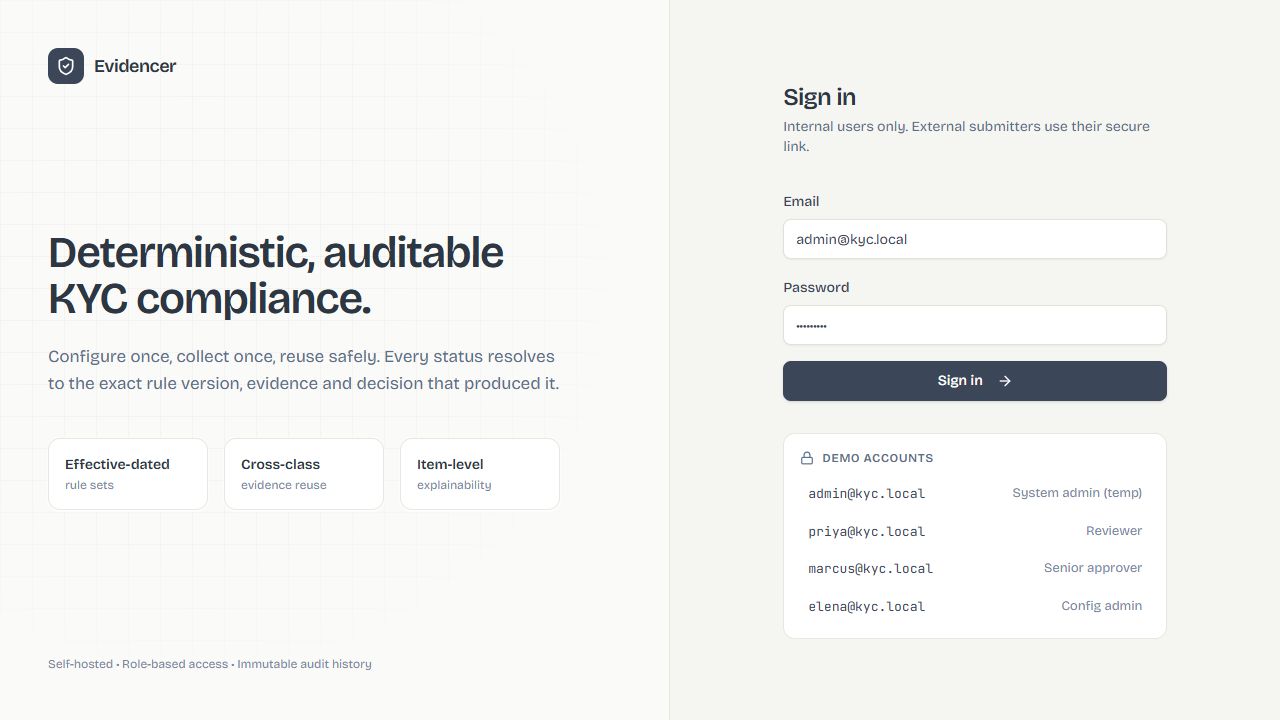
- Enter email and password.Repeated failures trigger the configured lockout.
- Replace a temporary password.Use Profile & password; minimum length is eight characters.
- Review new-browser alerts.They can include browser, OS, IP, time and optional approximate location.
- Use left navigation and global search.Search by name, reference, email or registration number.
- Use the user menu.Manage profile, theme and sign-out; use the bell for assignments, hand-offs and SLA alerts.
4. End-to-end KYC lifecycle
- Publish a class version.Only an effective published version can assess new work.
- Create a record.Primary keys are normalized; a match prevents duplication or adds the new class.
- Initialize assessments.A product class also enrolls its parent and inherits requirements.
- Issue a secure request.Select scope, items, expiry, mode, verification and delivery channels.
- Applicant verifies and submits.Drafts can be saved; files are chunked, signature-checked, scanned, fingerprinted and optionally extracted.
- Reviewer claims and decides.Dual workflows add a checker; rejected items can generate targeted rework.
- Engine recalculates.Conditions, alternatives, reuse, waivers, holds and expiry are applied deterministically.
- Monitor and renew.The scheduler sends renewal and SLA alerts; approved replacements supersede old evidence.
5. Technical flowcharts
These lane diagrams are configuration references. Each node names a product action or state boundary; arrows show the normal sequence and decision nodes show policy branches.
No OTP branch: deliver the form link only. Failed delivery is logged and does not silently mark the request as received.
Failure branches: expired/revoked/consumed token stops access; failed verification increments attempts; incomplete form remains draft or returns validation errors.
Extraction runs alongside the evidence record. It never silently overwrites an approved canonical value. Provider, model, confidence and evidence location are retained.
Fresh values are not fetched again until the freshness window expires unless a source value changes or an authorized user triggers Fetch now.
6. Operational dashboard
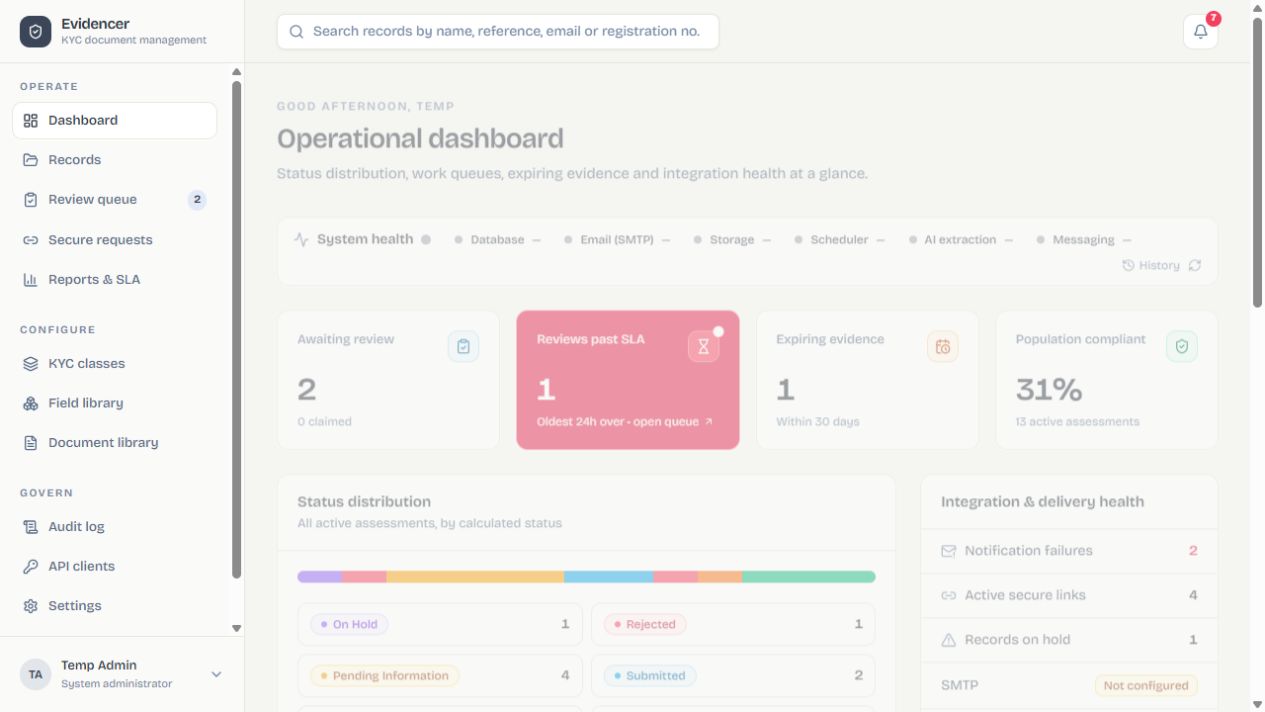
Top metrics
Awaiting review, past SLA, expiring evidence and population compliant. Select a card to drill down.
Status and class
Select a status; compliance by class shows compliant assessments divided by active assessments.
Integration health
Failures, active links, holds, SMTP, AI, database, scheduler, storage and messaging.
Daily work
Open unassigned review, expiring evidence and recent audit activity directly.
7. Records and subjects
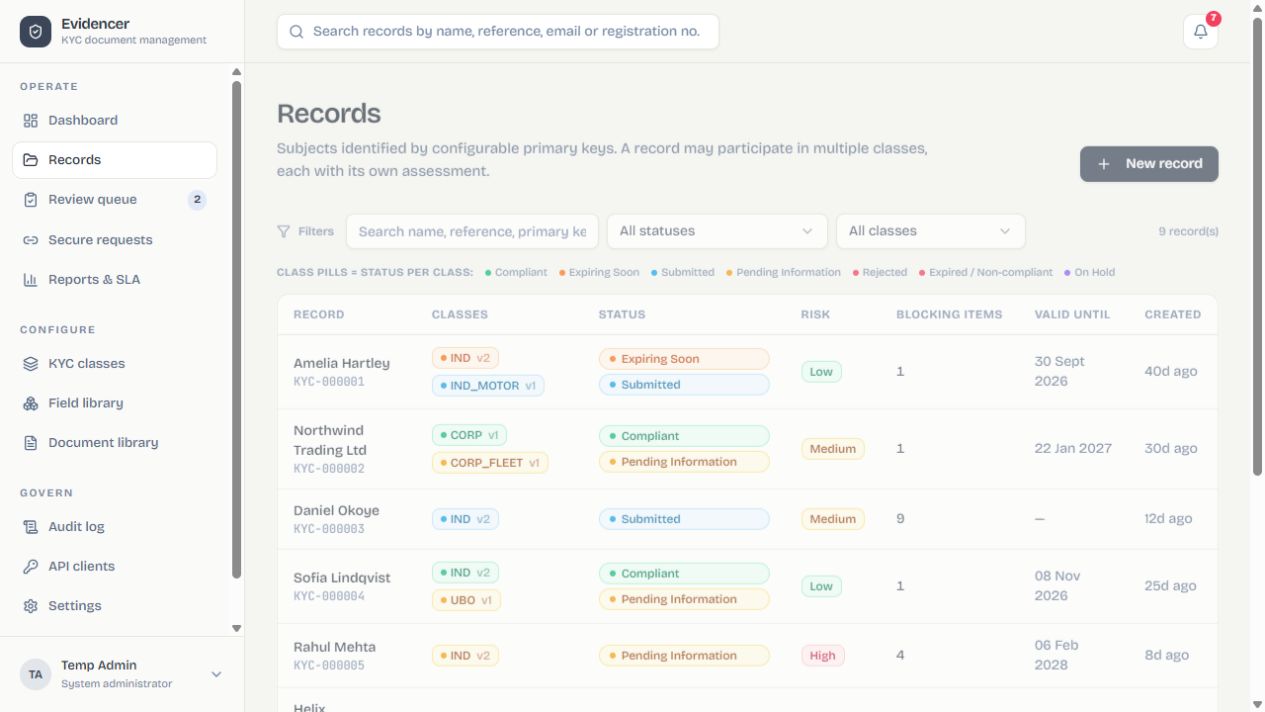
- Select New record and an active class.It must have a published version.
- Complete every primary key.These values identify the subject; display name is optional.
- Create.A same-class match is blocked; a cross-class match extends the existing subject.
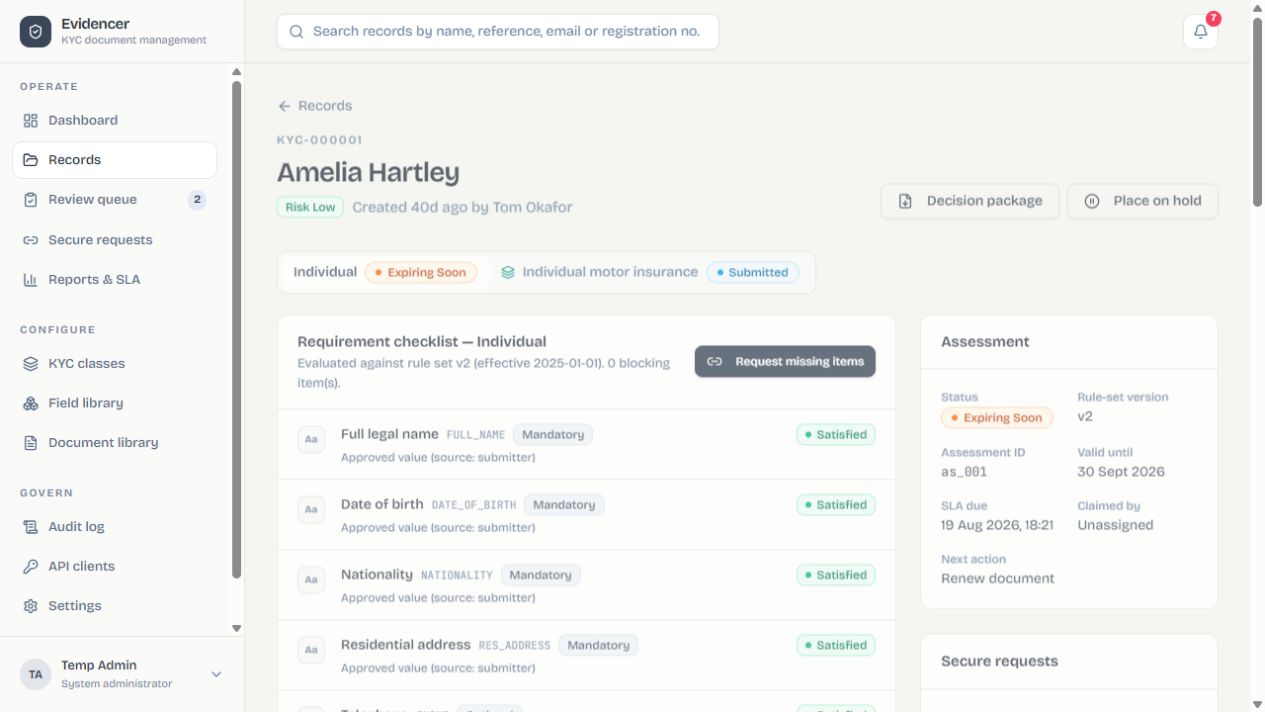
| Action | Result |
|---|---|
| Issue request | Creates a scoped token and delivery notification. |
| Place on hold | Stops affected assessments until authorized release. |
| Unmask sensitive value | Shows clear value and writes a sensitive-view audit event. |
| Fetch derived value | Runs the configured request and stores provenance. |
| Decision package | Exports record, rules, evidence and decisions. |
8. Create and deliver a KYC request
A KYC request is a scoped, expiring form for one existing record. Evidencer sends the form link to the recipient and, when one-time-code verification is selected, sends the secret through the same selected delivery channel or channels so the recipient can authenticate and update information.
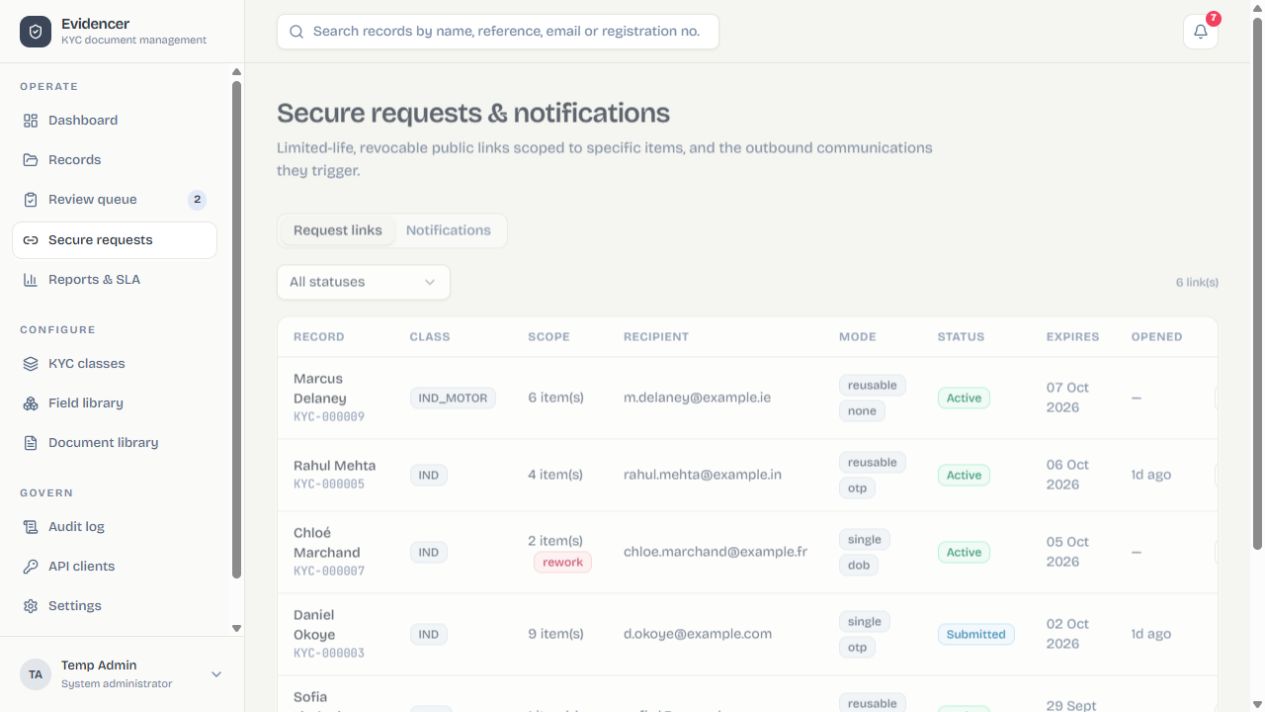
Before creating the request
| Check | Why it matters |
|---|---|
| Record and class enrollment | The form is generated from the record's active assessments and effective rule versions. |
| Recipient address | Email, phone or Discord ID must be present in the mapped record field or entered where the request dialog permits. |
| Public base URL | Links in delivered messages must resolve to the externally reachable HTTPS Evidencer address. |
| Delivery channel | SMTP/Twilio/Discord/generic webhook must be enabled, saved and tested. |
| Outstanding scope | Only necessary fields and documents should be exposed; accepted items should not be collected again. |
Operator procedure
- Open Records and select the subject.Confirm identity, classes, assessment versions and current blocking items.
- Select Issue request.Choose one or more enrolled classes. Evidencer proposes the outstanding fields and documents from applicable mandatory, conditional and rework requirements.
- Review the item list.Include only what the recipient must update. A rejected-item rework request should contain the rejected field/document plus any explicitly linked correction.
- Choose request mode.Single-use is consumed after a successful submission. Reusable allows draft/staged updates until expiry or revocation.
- Choose verification.None relies on possession of the secret URL; Date of birth compares the entered DOB with the record; One-time code adds a short-lived secret.
- Select delivery channels.Email, SMS, WhatsApp, Discord DM and/or the generic signed messaging webhook can be selected if configured. For OTP requests, the form link and the verification secret travel through the same selected channel set.
- Set expiry and recipient.The default lifetime comes from Settings → Reminders & links. Confirm the destination carefully.
- Create and send.Evidencer stores the request, constructs the tokenized URL, renders the channel template and dispatches the message. The notification and audit logs record the attempt and outcome.
- Monitor.Track delivery, opened, verified, draft-saved, submitted, expired or revoked states. Revoke immediately if the destination was wrong or the URL may be exposed.
What the recipient receives
Form message
Branded message containing purpose, subject/reference context, expiry, support wording and the unique secure form link. The form contains only authorized requested items.
Verification secret
For OTP, a short-lived one-time code is delivered by the same selected channel(s). Stored notification history masks the code. Date-of-birth verification sends no code.
Form characteristics
- Token-scoped: the recipient cannot browse other records or classes.
- Dynamic: conditional requirements update as source answers change.
- Validated: field patterns, ranges and allowed values come from the field library.
- Resumable when reusable mode is selected; draft saves do not create reviewer decisions.
- Document-aware: type, maximum size, minimum/maximum count and expiry metadata are enforced.
- Secure uploads: chunks are assembled, content-signature checked, scanned and SHA-256 fingerprinted.
- Accessible status: progress separates completed, outstanding and invalid items.
- Auditable: open, verification, draft, upload, submit, expiry and revocation events are recorded.
Delivery failure and recovery
If no selected channel can deliver, the request remains visible but the recipient may not have received it. Inspect Settings connection tests and the notification log, correct the destination/configuration, then issue a fresh request or securely convey the existing link according to policy. Demo fallback code 123456 must never be treated as a production delivery mechanism.
9. External applicant portal
- Open the unexpired link and verify.Revoked, expired or consumed single-use links cannot continue.
- Complete fields.Help and validation come from the library; conditional items update live.
- Upload documents.Follow type, size and count rules; chunk progress is visible.
- Resolve extraction prompts.Low-confidence results need human confirmation and never overwrite approved values silently.
- Save draft if allowed; then submit.The final action validates all current mandatory items and produces a receipt.
Upload protection
Content signatures, malware scanning, SHA-256 fingerprints and private storage apply. Removing an upload before submission removes it from the pending request.
Processing that occurs while the form is completed
AI extraction alongside the upload
When the selected document type has extraction enabled, Evidencer sends the clean uploaded file to the active AI provider after assembly and scanning. The document-specific prompt takes precedence over the global prompt. Returned values are mapped to configured metadata fields and stored with provider/model, confidence and evidence location. The upload remains the primary evidence; low-confidence or conflicting results require confirmation and reviewer comparison.
Automatic API-derived values
When a recipient completes all configured source fields for an API-derived field, Evidencer schedules the external lookup automatically. It builds the configured query, JSON or form payload, calls the service, maps the response path and stores the derived value with timestamp and provenance. Conditional requirements are recalculated when the value arrives.
10. Review and decisions
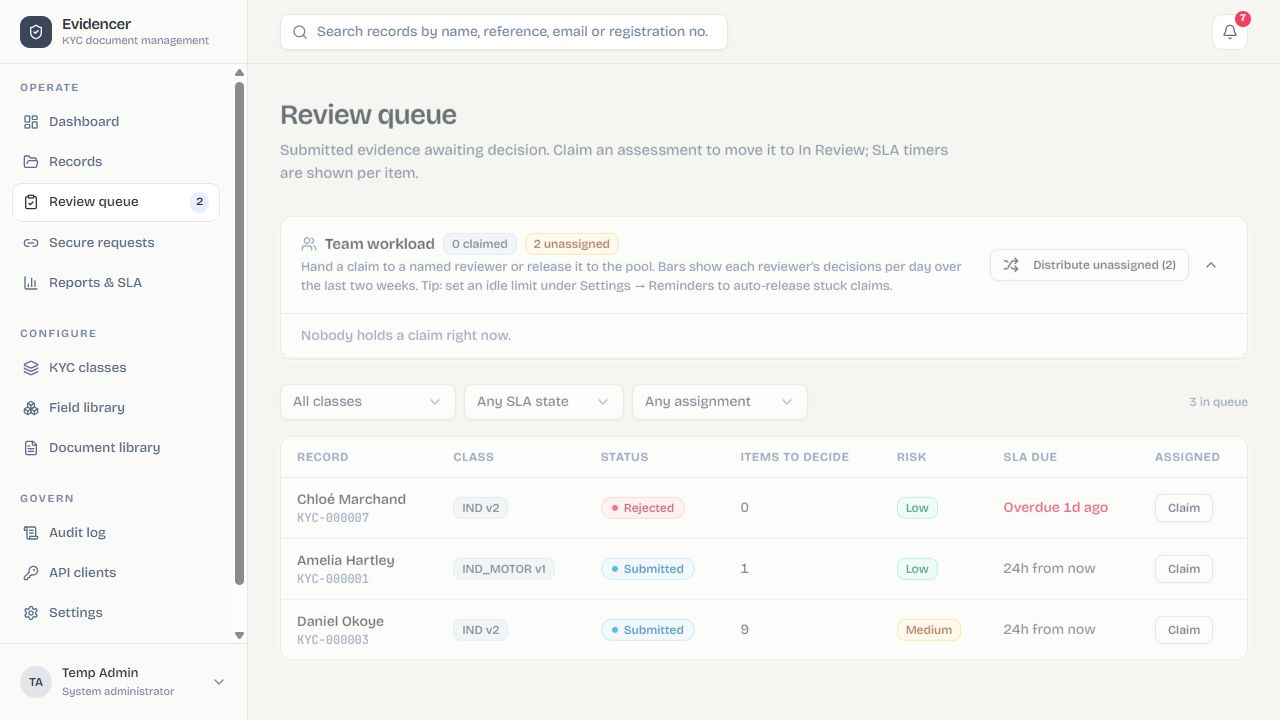
- Open and claim.Prioritize overdue/high-risk cases and prevent competing work.
- Inspect every pending item.Check preview, metadata, expiry, scan, fingerprint and extraction provenance.
- Approve or reject.For rejection, choose a reason and write clear applicant remediation; keep internal notes separate.
- Complete dual control when configured.Self-approval is governed by policy.
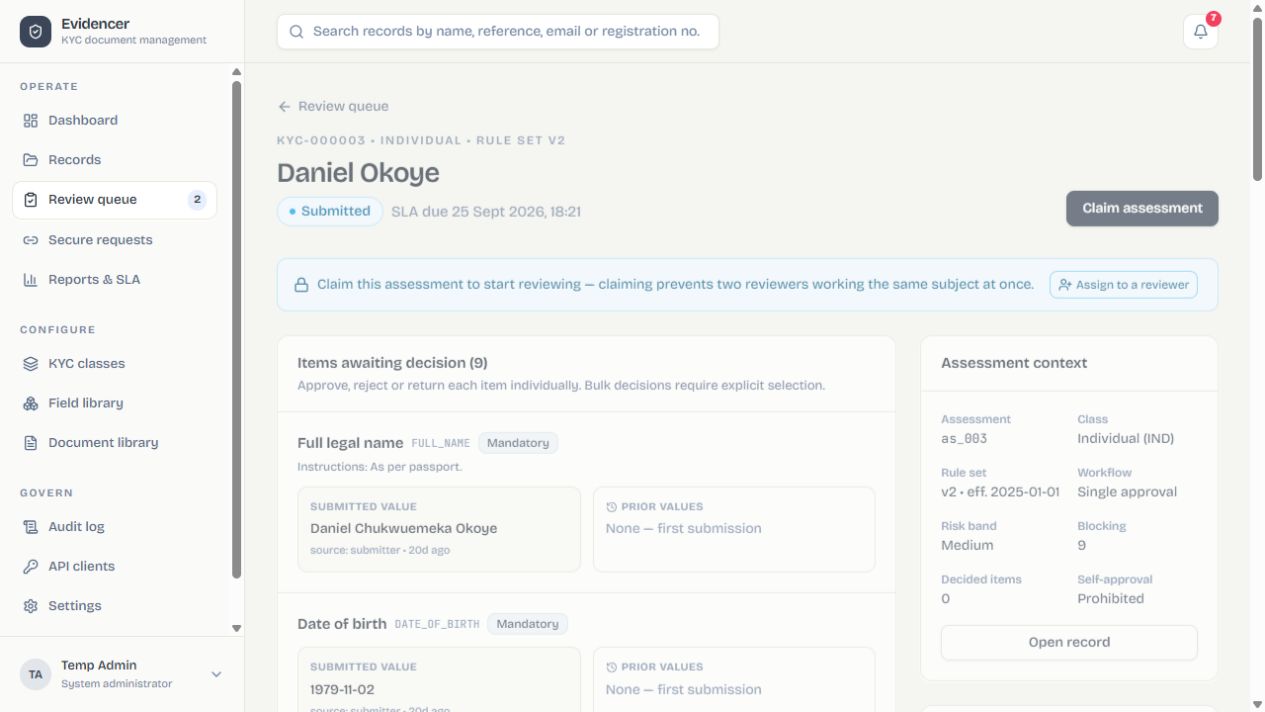
| Control | Purpose | Capability |
|---|---|---|
| Waiver | Authorized exception for a missing requirement | Override |
| Hold | Stops progression for investigation | Override |
| Reassign/release | Transfers or frees a claim | Release claims |
| Reject/return | Invalidates item and may issue rework | Review |
11. Reports and SLA
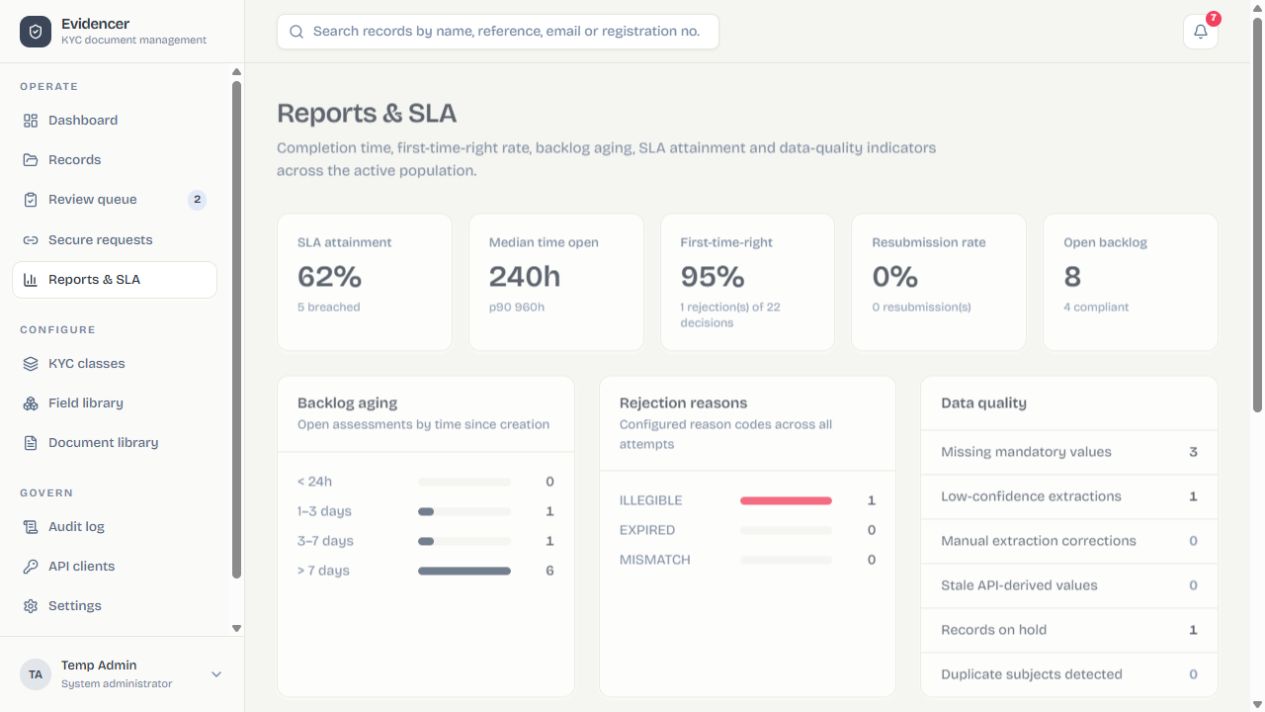
Compliance
Status and class counts identify blocked populations.
SLA
Submitted, claimed, completed, approaching and breached work plus lead workload history.
Expiry
Valid-until uses document expiry or validity policy; lead days drive renewal.
Delivery
Delivered, opened, bounced and failed notifications across channels.
12. Field library
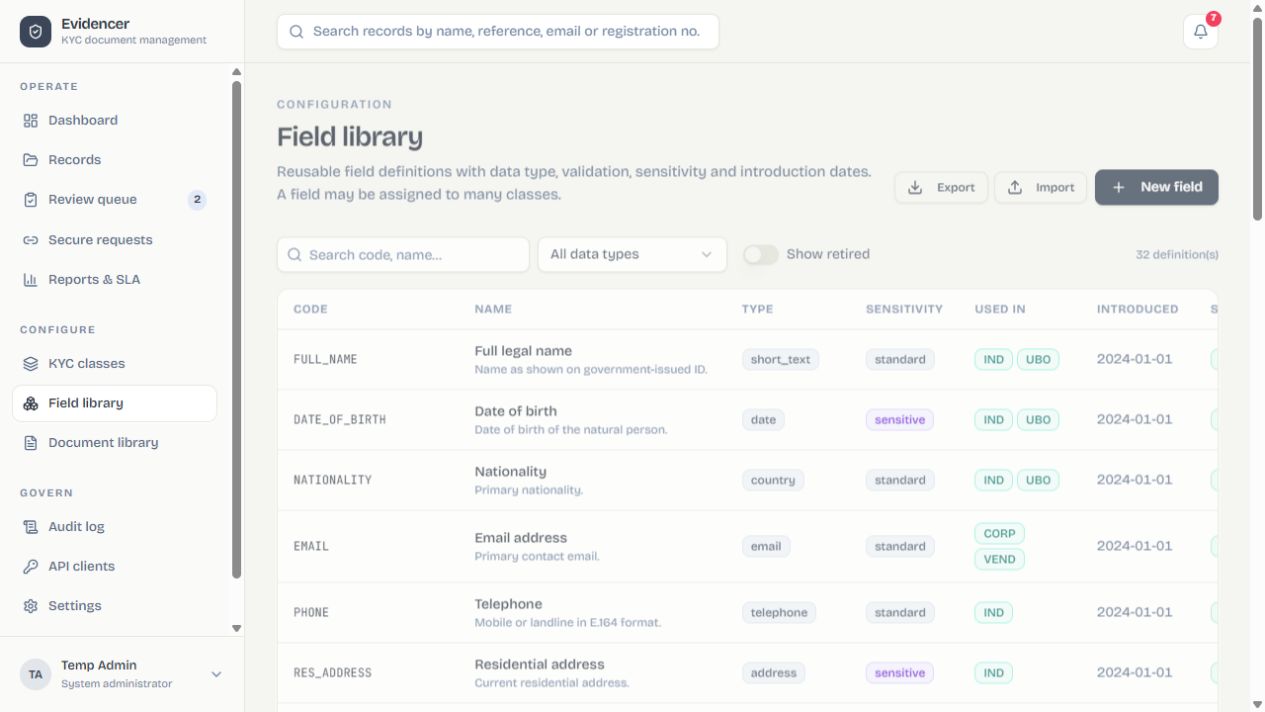
- Set stable code and name.Codes are integration identifiers.
- Choose type.Text, number, date, boolean, country, address, select, identifier, calculated or API-derived.
- Add description/help, sensitivity and owner.Unmasking sensitive/secret values is audited.
- Define validation.Length, regex/message, min/max/precision, values and uniqueness depend on type.
- Set introduction/retirement dates.Retire definitions used by history instead of deleting.
API-derived fields
Configure service, method/URL, query/JSON/form mapping, headers/auth, response path, freshness, auto-fetch, provenance and failure behavior. Test with sample values. Secrets are never echoed.
Configure automatic derivation
- Select the source fields.These are the values that must be present before automatic execution, such as country plus registration number.
- Configure request construction.Choose method, URL, headers/authentication and query, JSON or form mappings. Never place secrets in visible field values.
- Configure response mapping.Point the response path to the value to store and define any normalization.
- Set freshness and auto-fetch.Fresh values are reused; a source-field change invalidates provenance and schedules a new fetch.
- Choose failure behavior.Retry, allow manual fallback, or keep the requirement blocked.
- Test with samples.Verify request rendering and response mapping before attaching the field to a published class.
13. Document library
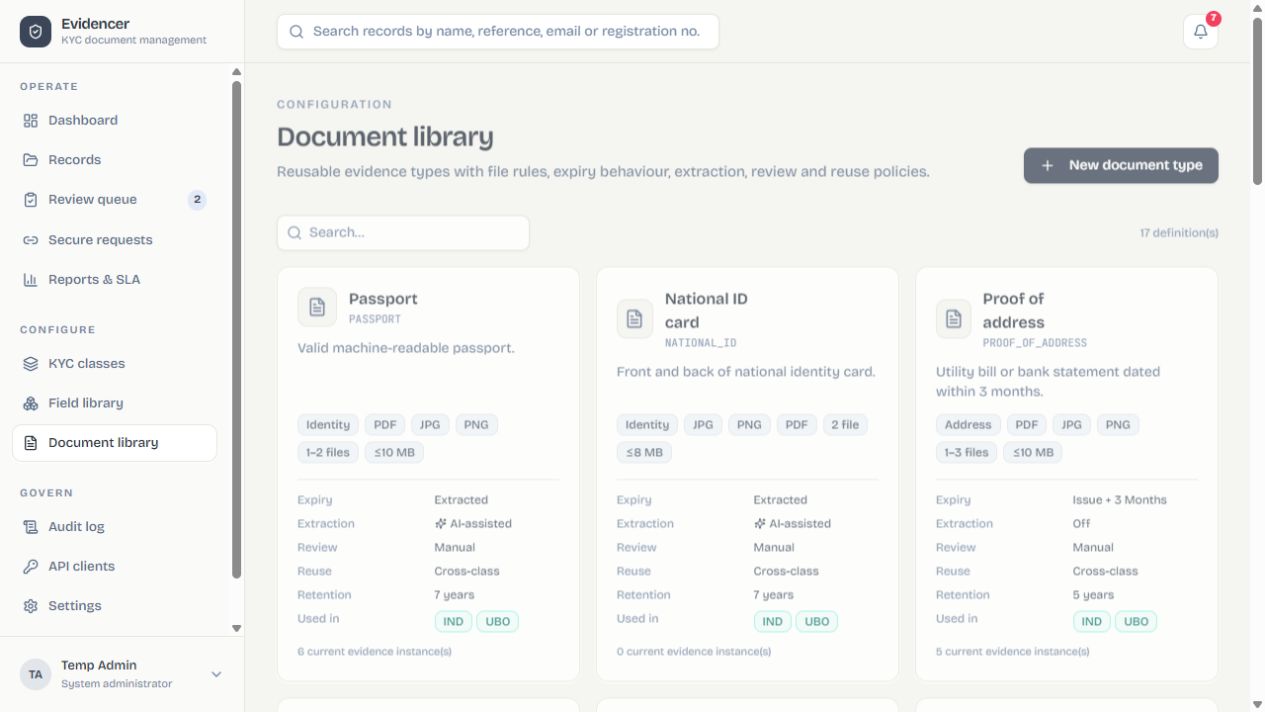
| Setting | Meaning |
|---|---|
| Types / size / count | Upload validation and multi-page/front-back rules. |
| Expiry | None, extracted, or calculated with validity months. |
| Extraction / prompt | Uses the active AI provider; a document prompt overrides the default. |
| Metadata fields | Maps extracted name, DOB, registration, expiry and other values. |
| Review / reuse | Manual or auto; reusable, class-only or non-reusable. |
| Retention / sensitivity | Governance, masking and downstream handling. |
Clone similar definitions. Delete is blocked when referenced; retire instead. Changing linked metadata after approval supersedes evidence and requests a fresh upload.
14. Classes, versions and requirements
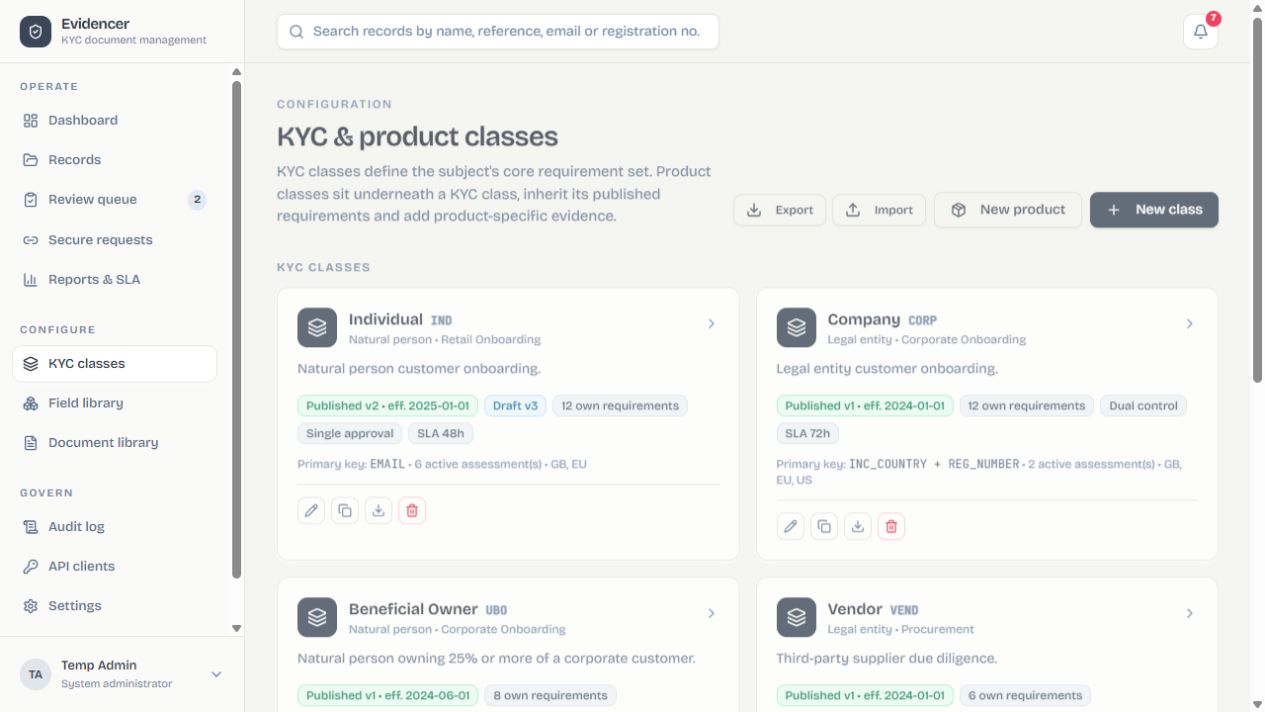
Define code, name, kind, subject type, primary keys, owner, jurisdiction, workflow, SLA and status. Product classes also select product and parent.
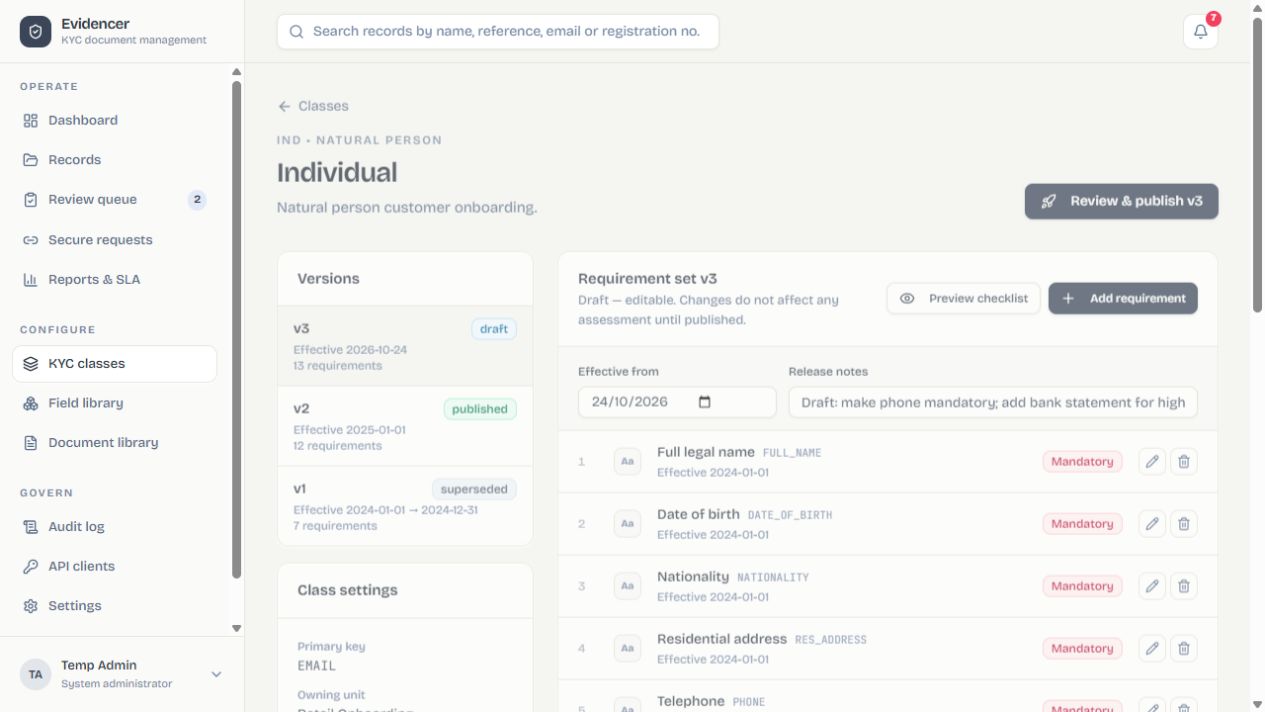
- Create a draft and set effective dates/notes.
- Add requirements.Choose field/document, necessity, order, instructions, dates, approver and reuse.
- Add conditions.For example
RISK_BAND == "High"; test true and false paths. - Use alternative groups.They express one-of rules such as Passport or National ID.
- Review inheritance and impact.Confirm affected records and new blockers, then publish.
Bundles
Export selected configuration plus dependencies. Import detects conflicts and remaps identifiers; review merge/overwrite decisions.
15. Configuration approvals
- Maker submits a new field, document or class.It remains unusable while pending.
- Admin opens Settings → Configuration approvals.Inspect the full definition, author and timestamps.
- Compare resubmission diff.Verify corrections after rejection.
- Approve or reject with a note.Approval activates; rejection provides actionable feedback.
16. API clients and webhooks
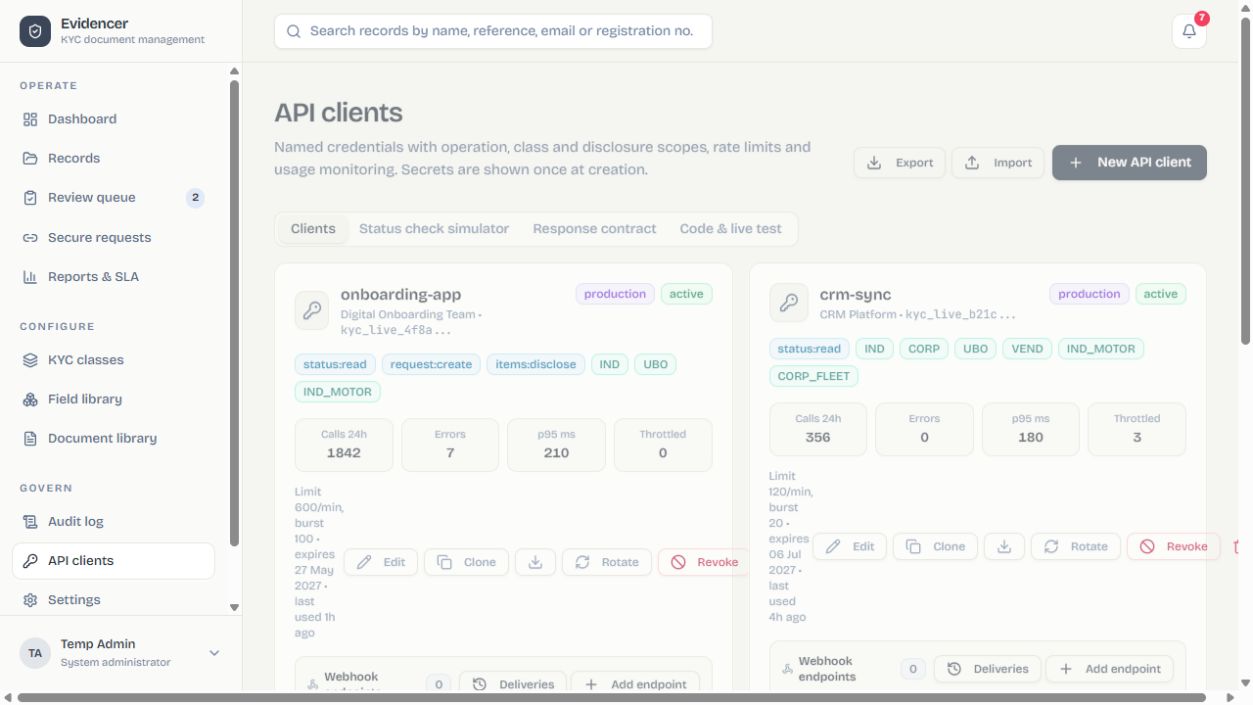
- Set name, owner and environment.
- Grant scopes.
status:read,request:create, anditems:discloseare separate. - Restrict classes and rates.Set per-minute and burst limits.
- Save the secret once.Store it in a secret manager; it is shown only at creation/rotation.
- Use code generator and simulator.Inspect exact HTTP status/body before integrating.
GET /api/v1/kyc/status?classCode=IND&recipientEmail=person@example.com
Authorization: Bearer kyc_live_…
X-Correlation-Id: your-trace-id
With request:create, “start KYC at source” can create an unknown subject and return a secure URL. Item detail requires items:disclose.
Webhooks
Add multiple endpoints with independent secret, events and delivery history. Consumers verify the raw-body HMAC, reject stale/replayed messages, respond 2xx quickly and process idempotently. Test, monitor retries, rotate with overlap, then remove old endpoints.
17. Audit and evidence
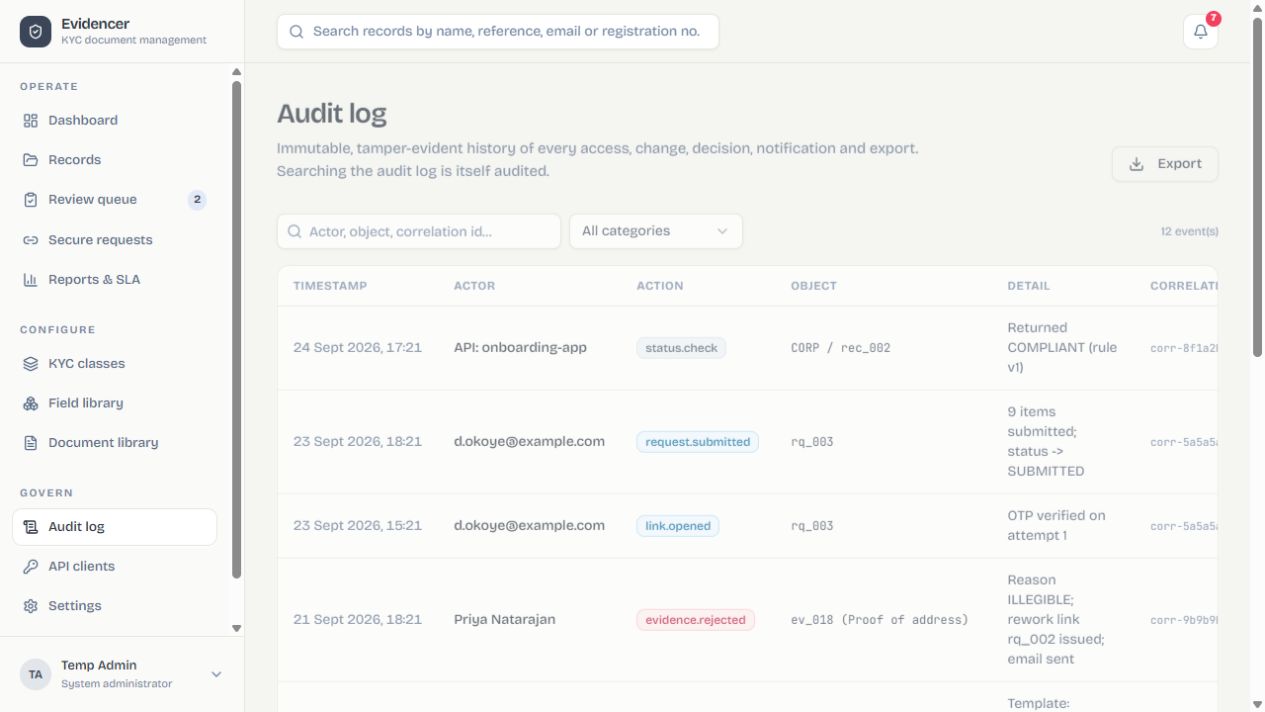
Events cover authentication, links, submissions, decisions, configuration, derived calls, sensitive views, reminders, holds, imports and API checks. Filter then export. Correlation IDs connect browser/API activity to notifications and webhook delivery.
Decision package
Point-in-time proof of classes, versions, requirement results, evidence, waivers and decisions.
Notification log
Channel, recipient, template/subject and outcome; OTP values are masked and secrets excluded.
18. Platform settings
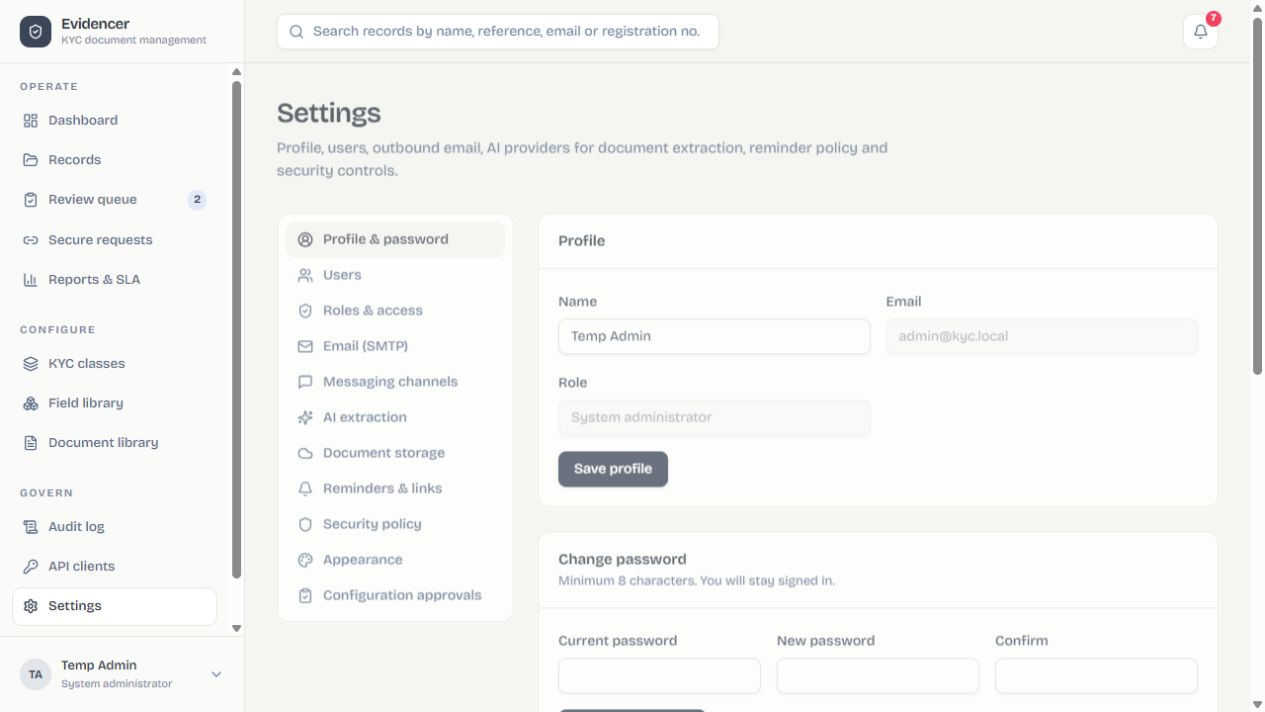
| Tab | Purpose |
|---|---|
| Profile & password | Name, password, known browsers, alerts, quiet hours, personal theme. |
| Users / roles | Accounts, temporary passwords, access, class scope, preview, history and bundles. |
| Email (SMTP) | Host, port, credentials, encryption and sender; save then test. |
| Messaging | Twilio SMS/WhatsApp, Discord and HMAC webhook; map destination fields. |
| AI extraction | Mistral, Anthropic, OpenAI, OpenRouter or Ollama; model, URL, confidence and test. |
| Storage | Local, S3, R2 or compatible endpoint; bucket, region, prefix and test. |
| Reminders & links | Lead days, expiry window, link life, public URL, interval and SLA warning. |
| Security / appearance | Sessions, lockout, self-approval, locations, branding, production and palettes. |
- Enter values and save.Existing secrets appear only as stored placeholders.
- Run the saved-connection test.Unsaved edits are not used.
- Inspect health and audit.Verify success before enabling dependent workflows.
19. Security and production
Sessions
Timeout limits inactivity; lockout limits guesses; users can forget browsers.
Data protection
Scanning, fingerprints, masking, write-only secrets and private object streaming.
Branding
Production workspaces can co-brand internal and applicant pages.
Backups
Back up MongoDB and uploads/bucket; test restore and secret recovery.
- Pre-flight.Change demo passwords; configure TLS/public URL, delivery, storage, backup and real admins.
- Open Security → Move to production.Review impact and type the confirmation phrase.
- Confirm.Demo records are removed and demo users deactivated; configuration remains.
- Smoke test.Create, deliver, upload, review, query status and verify audit/webhook.
20. Status model
| Status | Meaning | Next action |
|---|---|---|
| Compliant | All applicable mandatory requirements are valid and accepted. | Monitor validity. |
| Expiring soon | Valid evidence is within the warning window. | Renew. |
| Pending information | Applicable items are missing. | Issue request. |
| Submitted / In review | Items await decision / are claimed. | Review within SLA. |
| Rejected | An applicable item was rejected. | Targeted rework or authorized waiver. |
| Expired | Required evidence passed validity. | Request replacement. |
| On hold | An authorized hold overrides progression. | Resolve and release. |
| Not assessed / Cancelled | No active assessment / closed without completion. | Initialize again if required. |
Most blocking wins: hold, rejection, missing/submitted, expiry, expiring-soon, then compliant. Optional items do not block; false conditions do not apply; one valid alternative satisfies its group; a valid waiver satisfies its target.
21. Troubleshooting
| Symptom | Resolution path |
|---|---|
| Cannot sign in | Check spelling, status, lockout and temporary password; admin can reset/unlock. |
| Link fails | Check expired/revoked/consumed state and public base URL; create a new request. |
| OTP absent | Check enabled channels, mapped destination and provider status; run channel test. |
| Upload rejected | Check real file signature, size/count, corruption and scan. Renaming an extension does not help. |
| AI fails | Check active provider, saved key/URL/model and file; use connection/extraction tests. |
| Still blocked | Inspect assessment explanations for condition, alternative, rejection, expiry, hold and version. |
| Webhook fails | Check reachability, HMAC, timeout and 2xx; use test/delivery log and idempotency. |
| Storage fails | Check bucket, region/endpoint, policy, clock and prefix; save before retesting. |
| Scheduler idle | Check enabled/interval/lead boundary; run manually and inspect notification/audit. |
22. Quick reference
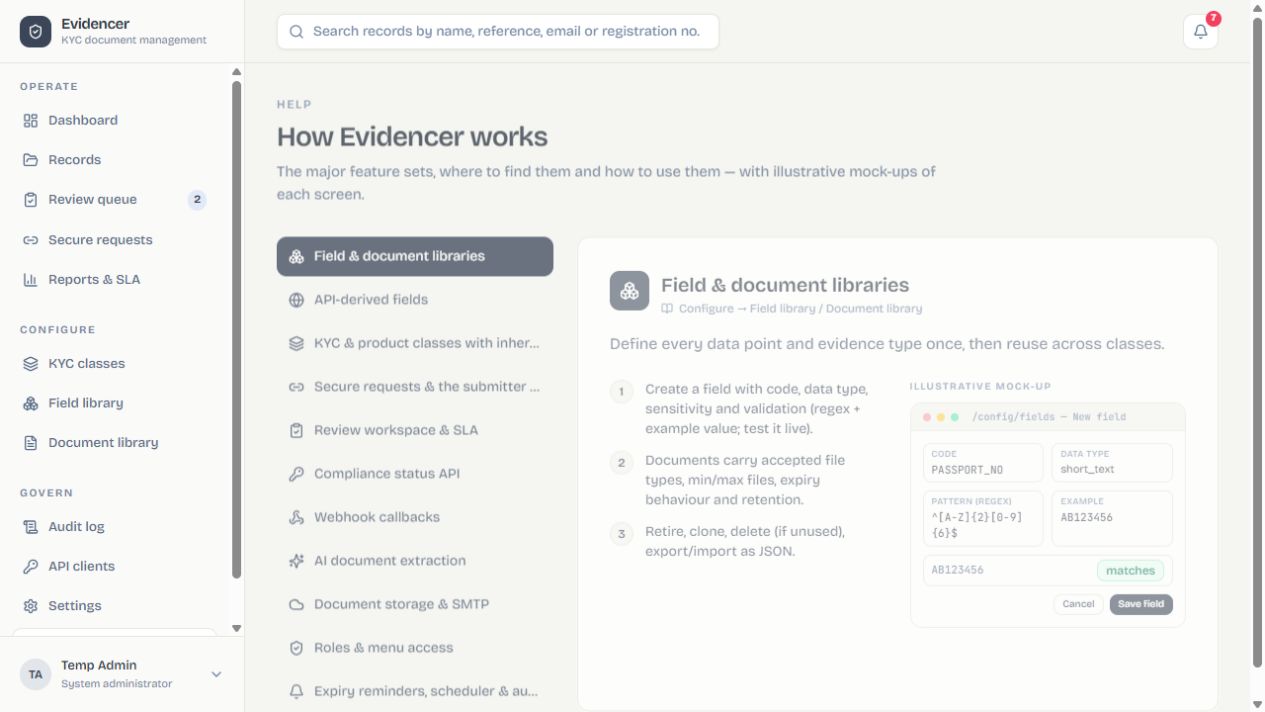
Operations daily
- Review health and failures.
- Match subjects with correct primary keys.
- Request only outstanding items.
- Revoke wrong/superseded links.
Reviewer daily
- Prioritize overdue/high risk.
- Claim before inspecting.
- Check file, expiry and provenance.
- Write precise remediation.
Configuration release
- Draft, never rewrite history.
- Test conditions/alternatives.
- Review inheritance/impact.
- Publish with date and notes.
Administrator weekly
- Review access and lockouts.
- Monitor delivery, webhooks, AI, storage.
- Confirm scheduler/backups.
- Rotate expiring credentials safely.
| Record | Unique subject. | Assessment | Record evaluated against one class/version. |
|---|---|---|---|
| Evidence | Versioned document and decisions. | Requirement | Field/document rule. |
| Class | KYC population or product extension. | Waiver | Authorized exception. |
| Alternative group | One valid member satisfies the group. | Correlation ID | Trace key across events. |
End of manual · Evidencer user and administrator guide.